
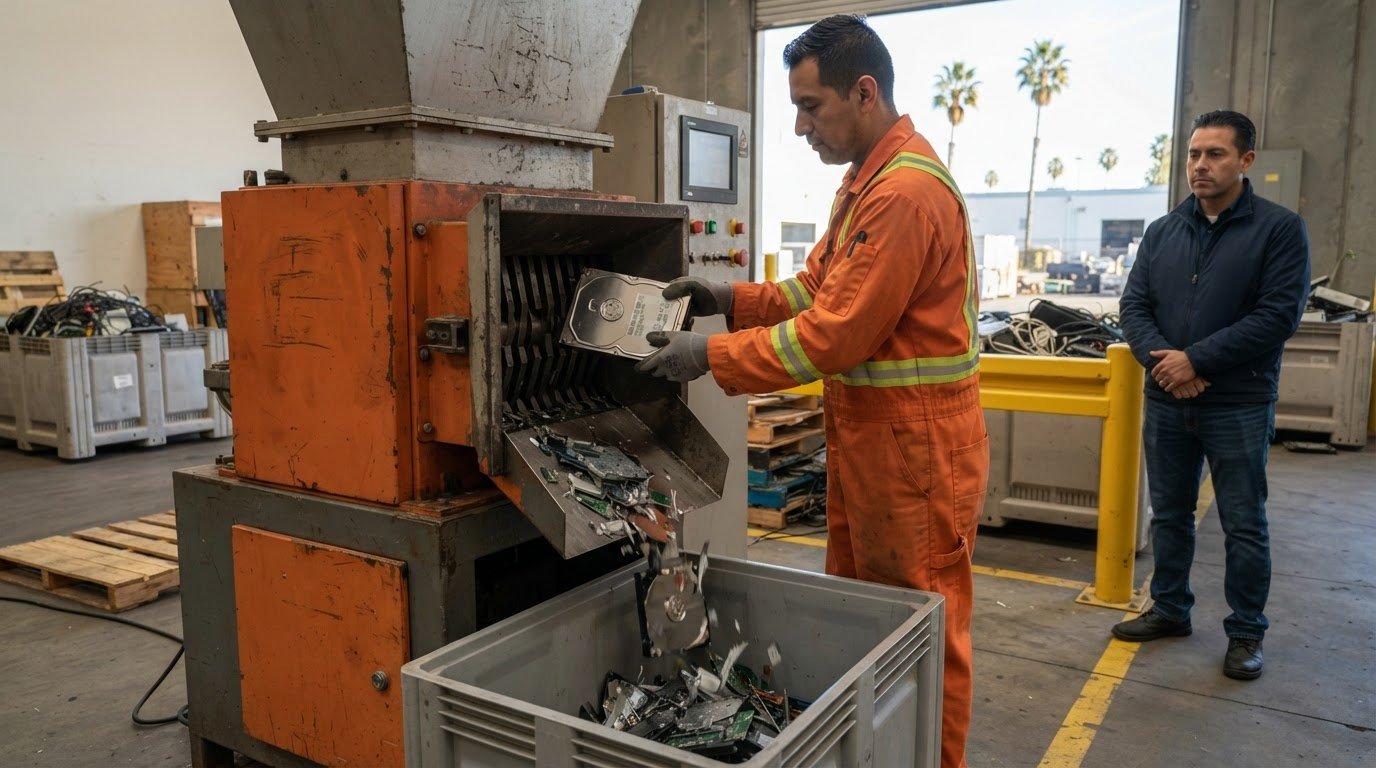
Deleting a file does not necessarily destroy it. For secure media destruction in Westminster, erase or clear private electronic data, and reliably erase or physically destroy media that contains sensitive information. Encryption also helps protect confidential files while they are stored.
It’s understandable to want assurance that nobody can access information on an old hard drive after it leaves your hands. The right approach depends on the media and the data it holds, but a clear end-of-life process helps prevent devices from being misplaced, reused, or discarded before they are handled securely.
This guide explains how hard drives and other electronic media can be destroyed, what to expect from on-site destruction, and whether you can witness the process. You’ll also learn how to protect data while devices await destruction and choose a secure next step for personal or business electronics.
Key Takeaways
- Protect sensitive information while devices await destruction by restricting access and keeping media in a secure, dedicated location.
- Learn why deleting files may not be enough, and how reliable erasure or physical destruction can address data stored on old media.
- See how on-site destruction and customer witnessing can fit into a documented, controlled process.
- For unwanted electronics, OC Recycling’s Electronics Recycling and Certified Product Destruction offerings provide relevant next steps.
IS MY DATA SECURE?
Data security depends on both the destruction method and documented handling. A certificate and traceable inventory help show what happened to each device.
Destruction Certificates and Compliance Documentation
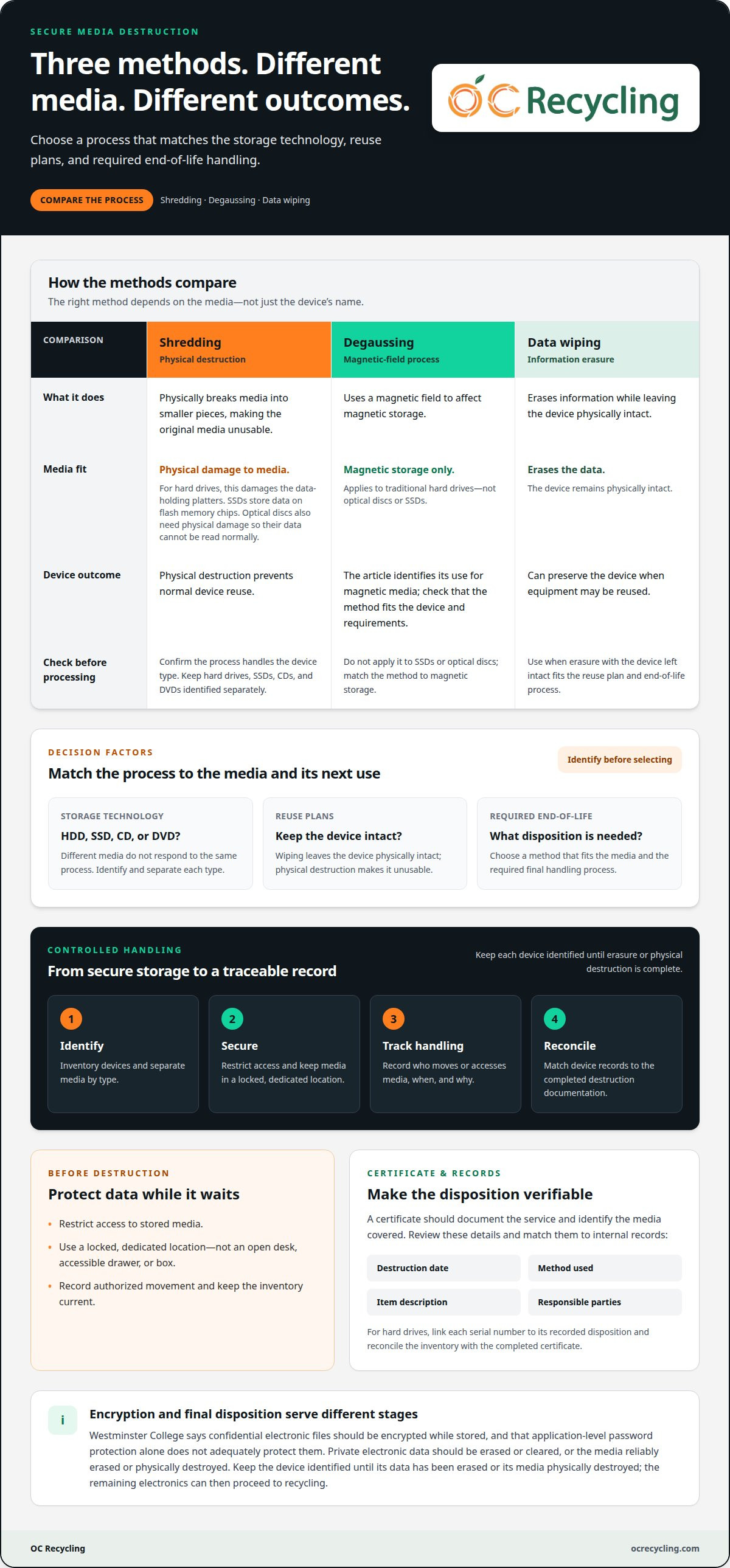
A certificate of media destruction should document the service performed and identify the media covered. Review the destruction date, method, item description, and responsible parties. Match these details to your internal records so the certificate supports your organization’s retention and audit process. Keep it with related transfer or approval records rather than relying on a general statement that a batch was destroyed.
For hard drives, maintain an inventory linking each serial number to its recorded disposition. Compare the list with the devices collected, then reconcile it against the completed certificate. If a drive is missing from the paperwork, you can investigate while handling records are still available. A clear inventory also helps distinguish devices awaiting destruction from equipment approved for reuse.
Certified Destruction Standards
“Certified data destruction” can refer to a process backed by documented procedures or an organization’s credential. Check what the certification covers: the method, facility, staff, or a specific service. NAID AAA Certified shredding and data destruction is a named credential to ask about, but the wording alone does not establish that every device or method is within its scope. Match the credential’s stated scope to your media and requirements.
Westminster College says electronic files containing confidential information should be encrypted, and that application-level password protection alone does not adequately protect them. It also says private electronic data should be erased or cleared, or the media reliably erased or physically destroyed. These steps address different stages: protect files in storage, then document the device’s final disposition.
Before pickup or destruction, restrict access to stored media and record who moves or handles it, when, and why. Keep old drives in a locked, dedicated location, not on an open desk or in an accessible drawer or box. These practical controls reduce the risk of loss before the destruction record is complete.
Yes, electronics recycling can follow secure data destruction. Keep each device identified until its data has been erased or its media physically destroyed, then send the remaining electronics for recycling.
Destroying hard drives and electronic media
Choose a destruction method suited to the storage technology and the information it holds. Hard drives, solid-state drives (SSDs), CDs, and DVDs do not all respond to the same process.
Hard Drive and SSD Shredding
Shredding physically breaks storage devices into smaller pieces, making the original media unusable. In hard drives, this damages the platters that hold data; SSDs store data on flash memory chips instead. Ask which device types the destruction process handles, and ensure the inventory identifies each drive before processing. Do not assume a method suited to one technology also covers another. Keep device records aligned with the final destruction documentation.
CD and DVD Destruction
CDs and DVDs store information on optical discs, not magnetic platters or flash chips. Their destruction must physically damage the disc so its data cannot be read normally. Include optical media in the device inventory rather than grouping it with hard drives. For example, archived discs may contain sensitive files even after the computers that created them are gone. Record the media type and its disposition separately.
Comparing Shredding, Degaussing, and Data Wiping
Shredding physically damages media. Degaussing uses a magnetic field, so it applies to magnetic storage such as traditional hard drives, not optical discs or SSDs. Data wiping erases information while leaving the device physically intact. In short, shredding physically destroys media, degaussing affects magnetic media, and wiping clears data without breaking the device. The right choice depends on media type, reuse plans, and the required end-of-life process.
For hard drive destruction, identify whether each device is a hard disk drive or an SSD before selecting a method. If equipment may be reused, data wiping can preserve the device, while physical destruction prevents normal reuse. For mixed-media destruction, prepare a clear inventory that separates hard drives, SSDs, CDs, and DVDs. This helps match each item to the intended process and keeps the final records useful.
On-site destruction and customer witnessing
On-site destruction lets an organization observe media being processed at its premises. Prepare the devices, access controls, and records before the destruction team arrives.
Chain of Custody and Facility Security
A secure chain of custody records each transfer from storage through destruction. Restrict access to authorized employees, and document who moves or accesses media, when, and why. These records help trace a device’s handling if an inventory discrepancy appears. For facility processing, review how media is controlled between arrival and destruction, and how completed records identify the processed items.
Preparing Devices and Media
Before destruction, businesses should identify devices, separate media by type, and prepare an inventory. Remove each item from general-use areas and place it in a locked, dedicated storage location while it awaits processing. Assign an employee to maintain the inventory and record every authorized movement. This keeps sensitive information away from routine disposal and makes handoff records easier to reconcile.
If you plan to witness destruction, agree which devices the observer will watch being destroyed and match them to the inventory. Keep confidential screens, labels, or documents out of view unless needed to identify the media. Witnessing provides direct observation of the process; chain-of-custody records document handling before and after. Neither replaces the other when both are part of your organization’s procedure.
A customer contact form can record the organization’s authorized contact, device-list reference, access instructions, and request to witness destruction. Use it to keep practical arrangements consistent with internal records. Store insurance documents with relevant business files, but separately from device-level custody records. For example, an insurance record may relate to the organization’s broader risk arrangements, while an inventory tracks specific drives and their movement.
Secure destruction of digital and electronic media
Westminster-area providers include businesses offering electronics recycling and data destruction. Ask which device types their process covers, since a hard drive, phone, and backup tape use different storage formats.
Hard Drive and SSD Destruction
Hard drives and SSDs both store digital information, but use different technologies. Identify each device type before selecting a destruction method, then match the method to your security needs and reuse plans. Do not assume a process designed for magnetic hard drives is suitable for SSDs. Keep the inventory specific, with separate entries for each format and its final disposition.
Phone and Backup Tape Destruction
Phones may hold work files, messages, or account details, while backup tapes can contain archived business data. Include both in the disposal inventory instead of treating them as ordinary electronics. Record the device or tape type, identifying details, and whether it contains information requiring destruction. This gives the handling team clear instructions and makes the final disposition easier to reconcile.
For mixed media, create separate categories for hard drives, SSDs, phones, and tapes. Compare the accepted-media details and destruction process with your inventory. A provider should explain how each category is handled, what records document the work, and whether the process involves erasure or physical destruction. This helps match the method to the device instead of relying on a broad label such as “electronics.”
Before disposal, keep devices containing sensitive digital information in controlled storage and limit access to designated staff. Use a written end-of-life procedure to identify who approves destruction, how devices are recorded, and where completed records are kept. For example, reconcile a phone inventory against its destruction documentation before closing the equipment record. This final comparison can catch a missing device or incomplete entry.
For organizations planning the next step, explore data destruction services for a dedicated route to handling unwanted data-bearing media.
OC Recycling: CRV Redemption
OC Recycling offers Electronics Recycling and Certified Product Destruction for unwanted electronics and products requiring destruction. Once sensitive data has been securely handled, electronics recycling helps keep devices in a dedicated recycling stream rather than ordinary disposal. Certified Product Destruction is suited to products that need to be destroyed, not simply recycled.
Choose your next step based on what you have: electronics for recycling or products that need destruction. Keep data-bearing devices identified until the appropriate data destruction process is complete, then arrange their onward handling. CRV Redemption serves a separate need for eligible CRV containers, not hard drives or electronic media.
Contact OC Recycling to discuss your electronics recycling or Certified Product Destruction needs.
Make your next media-disposal step count
Build secure media destruction in Westminster into your organization’s equipment retirement process, not as an afterthought. Assign ownership for approving disposal, maintaining device records, and closing each equipment entry once its final handling is documented. That routine makes future media decisions clearer, even as devices and storage formats change.
Once devices have completed their data-handling process, OC Recycling offers Electronics Recycling. Scrap Metal Purchasing and CRV Redemption serve separate material streams, helping you direct items to the appropriate next step instead of mixing them with data-bearing equipment.
Whether you’re managing a business equipment refresh or sorting through individual electronics, a clear plan starts with identifying what needs data destruction and what can move to recycling. Contact OC Recycling about media destruction to discuss your next step. With a thoughtful process in place, you can move forward with greater confidence and keep disposal decisions organized.
Frequently Asked Questions
What secure media destruction services are available in Westminster, California?
Options include data destruction, Certified Product Destruction, and Electronics Recycling. OC Recycling provides these services for data-bearing electronics and other products requiring destruction, and recycles more types of material than any other local center. For readers in Westminster, nearby service communities include Santa Ana, Anaheim, Costa Mesa, Huntington Beach, Orange, Irvine, Garden Grove, Fountain Valley, and Tustin. Choose according to whether your priority is destroying data, destroying a product, or recycling electronics after data handling.
Do Westminster media destruction providers offer on-site shredding or off-site destruction?
On-site work takes place at your premises, while off-site destruction involves transferring devices for processing elsewhere. For secure media destruction in Westminster, decide whether your process requires observation at your premises or controlled transfer to a facility. The right arrangement depends on facility access, witnessing needs, and internal procedures. Keep your device inventory aligned with the agreed process and record each handoff.
What security certifications and data protection standards should a media destruction company meet?
Look for a clearly described destruction process that covers the media types you need handled, including hard drives, SSDs, phones, or tapes. NAID AAA is a credential associated with shredding and data destruction, but check that its scope matches the specific service and devices involved. For stored confidential files, Westminster College says acceptable encryption methods are defined by the National Institute of Standards and Technology.
What certificates of destruction and chain-of-custody records do providers supply?
Ask for a certificate documenting completed destruction and records that connect processed items to your asset list. For secure media destruction in Westminster, reconcile the provider’s records with your inventory before closing equipment records. Chain-of-custody documentation should make transfers traceable, including who handled or moved media and when. Retain these records with the related internal approval.
What are the steps for scheduling secure media destruction in Westminster?
Start by identifying media types and separating devices that need data destruction from electronics ready for recycling. Prepare an inventory, assign an authorized contact, and decide whether you need witnessing or specific records. Then arrange the service and follow the agreed handoff process. After completion, compare the documentation with your inventory and retain it alongside the organization’s equipment records.
What risks arise from improper disposal of data-bearing devices?
An accessible old drive may expose confidential information to employees who do not need it, or it may be mistakenly discarded with regular trash. A forgotten backup tape can also preserve sensitive files after a business retires the system that created them. Clear ownership and controlled storage help reduce these risks. For example, label retired devices and keep them separate from equipment approved for reuse.