

A drive can look erased and still hold recoverable information: a 2023 study by Blancco Technology Group found that 42% of used drives purchased on eBay contained recoverable personal or corporate data. That’s the central risk of improper data destruction: sensitive files may remain accessible after a device is retired, creating an opening for exposure, a data breach, and regulatory penalties. Deleting files or damaging a device doesn’t necessarily make its data irretrievable.
It’s understandable to assume a discarded or wiped device is no longer a security concern. But the method and completeness of destruction matter, especially when a device has stored customer, employee, financial, or health information.
This article explains how data can survive incomplete destruction, what can happen if it’s recovered, and how secure data destruction can reduce the risk. You’ll also learn how wiping, degaussing, and physical destruction differ, why documentation matters, and when professional destruction can support a safer, more accountable disposal process.
Key Takeaways
- Deleting files or damaging a device may leave data recoverable, so choose a destruction method suited to the storage media.
- Use NIST SP 800-88 guidance to understand how to select an appropriate media sanitization method.
- Keep a record for each device, including its serial number, destruction method, date, and completion status.
- Improper disposal can expose sensitive information and lead to breaches, legal penalties, and loss of trust.
- Include secure data destruction in your retirement process for devices that have stored personal, financial, or health information.
Examples of breaches linked to improper device disposal
Improperly discarded devices can expose data long after an organization considers them retired. These cases show how incomplete wiping can lead to unauthorized access, breach response costs, legal action, and lasting reputational harm.
Confidential Data Exposure
Confidential data is exposed when someone recovers information from a discarded device and accesses it without authorization. Files may include customer records, financial details, or health information. For organizations, the risk extends beyond the device itself: exposed data can prompt investigations, breach notifications, lawsuits, and costly response work. A wiped screen or damaged casing doesn’t prove stored information is unrecoverable.
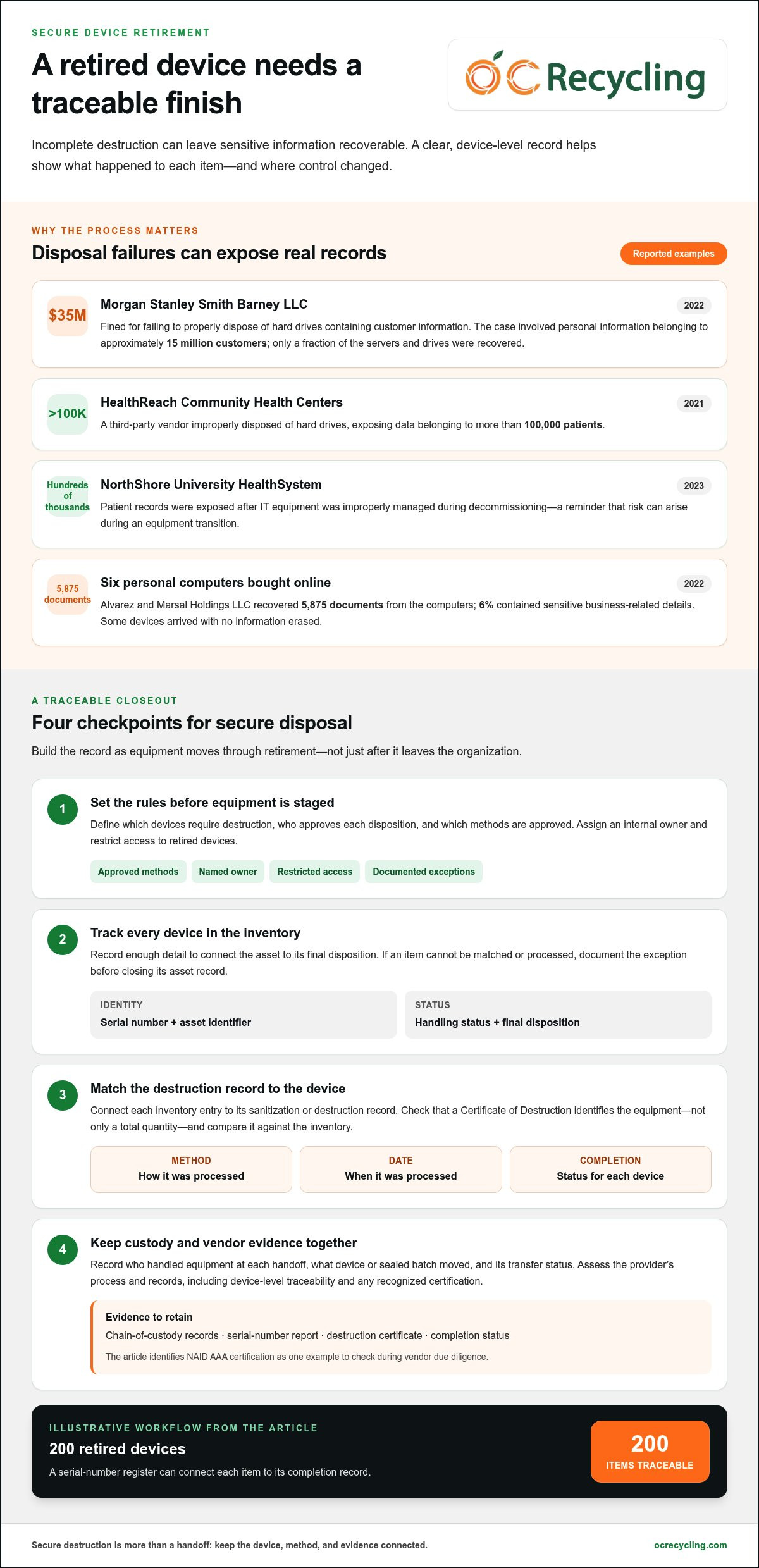
Morgan Stanley Smith Barney LLC illustrates how disposal failures can affect customers and trigger enforcement. In 2022, the firm was fined $35 million for failing to properly dispose of hard drives containing customer information. The case involved personal information belonging to approximately 15 million customers. Only a fraction of the servers and drives containing customer data were recovered.
HealthReach Community Health Centers experienced a breach in 2021 after a third-party vendor improperly disposed of hard drives. The incident exposed data belonging to more than 100,000 patients. For a healthcare organization, records left on a discarded device can reveal sensitive details to people who have no authorized reason to see them. Vendor handling matters because an organization’s disposal process can involve outside parties.
NorthShore University HealthSystem reported in 2023 that hundreds of thousands of patient records were exposed after IT equipment was improperly managed during decommissioning. The example shows that risk can arise during an equipment transition, not only after a device reaches a resale or disposal destination. Inventory and secure wiping need to account for devices throughout retirement.
Reputational Damage
Reputational damage is the loss of trust that can follow public disclosure of a data breach. Customers, patients, and business partners may question whether an organization protects confidential information across its operations. A device-disposal incident can make a routine process look like a broader failure of oversight, especially when a vendor or auction sale is involved. Trust can be difficult to rebuild after exposed records make the news.
In a separate example involving six personal computers bought online in 2022, Alvarez and Marsal Holdings LLC found that some arrived without any information erased. Data recovery retrieved 5,875 documents, and 6% contained sensitive business-related details. That discovery demonstrates how resale can move information beyond the organization’s control, even when buyers simply expect used equipment.
Response costs can compound the damage. These risks show why complete, documented data destruction matters before a device leaves an organization’s control.
What Are the Risks of Incomplete Data Destruction?
Improper destruction can leave sensitive data recoverable, allowing unauthorized people to access it and potentially misuse personal information. A discarded device can therefore become a route to data breaches and identity theft, even after routine wiping or physical damage.
A useful policy defines which devices require destruction, who approves each disposition, and what records close the process. A vendor checklist should cover serial-number tracking, the destruction method, date, completion status, certification, and chain-of-custody documentation.
Documentation turns disposal from an informal handoff into a traceable process. For each storage device, record its serial number, asset identifier, handling status, and final disposition. Match that entry to the sanitization or destruction record, including the method, date, and completion status. If a device is missing from the register, the gap is visible before staff close the asset record.
A Certificate of Destruction can document that specific equipment was destroyed, but it works best when it identifies the devices. A certificate that lists only a total quantity may not show which serial numbers were included. Compare the certificate against the organization’s inventory, then retain both records together for audits, incident reviews, and internal accountability.
Chain of custody records who handled equipment as it moved from storage to final disposition. Each handoff should identify the device or sealed batch, the responsible party, and the transfer status. These records help locate a missing asset and clarify where control changed. For an illustrative financial-services workflow covering 200 retired devices, a serial-number register can connect each item to its completion record.
Assess a vendor’s process and its evidence, not just its service description. Check whether the provider holds NAID AAA certification or another recognized certification, and whether its records support device-level traceability. Certification can inform due diligence, while serial-number reports and custody records show how a particular batch was handled.
Set policy before equipment reaches a storage room or loading area. Assign an internal owner, define approved methods, restrict access to retired devices, and require a documented exception when an item cannot be matched or processed. These steps reduce the chance that sensitive data travels with equipment into resale, recycling, or another uncontrolled destination.
For a documented process, include secure destruction records in the organization’s disposal plan and retain them with its asset inventory. A clear record helps teams answer practical questions: which device was processed, what happened to it, and when was the work completed?
Legal and regulatory consequences of improper IT asset disposal
In the United States, applicable rules depend on an organization’s location and data; relevant frameworks include CCPA, HIPAA, GLBA, SOX, and PCI DSS. Penalties depend on the law and violation: the CCPA can impose fines of $2,500 per violation or $7,500 per intentional violation, according to California Legislature.
Regulatory Fines and Compliance Risks
Regulatory risk arises when electronic disposal exposes personal information or conflicts with an organization’s obligations. The consequences matter because regulators may investigate both the breach and the controls surrounding retired equipment.
For California residents’ data, the CCPA addresses opt-out options, data deletion, and transparent data practices. California Civil Code § 1798.81 is also connected with secure disposal of personal data. Organizations should map the information stored on each device to applicable rules before retirement, then preserve records showing how disposal was handled.
Legal Exposure and Penalties
Legal exposure can include regulatory fines, lawsuits, and costs tied to responding to a breach. HIPAA violation fines range from $100 to $50,000 per violation, depending on the level of negligence.
The scale of exposure depends on the law involved, the type of information, and the circumstances of the incident. A documented disposal process helps an organization explain its decisions, identify affected equipment, and respond to inquiries. Without records linking devices to their final disposition, it can be harder to establish what happened to sensitive data.
Applicable Laws and Regulations
Applicable laws govern how an organization protects and manages particular information. HIPAA concerns healthcare entities and health information, while GLBA, SOX, and PCI DSS may be relevant depending on the organization and the data it handles.
GDPR can also matter to a U.S. business handling personal data of EU residents. It requires appropriate security measures throughout the data lifecycle. The right to erasure appears in GDPR Article 17, making data handling and retention relevant to disposal decisions.
There isn’t one disposal rule that applies identically to every U.S. organization. A healthcare provider handling health information must consider HIPAA; a California business handling residents’ personal data must consider the CCPA. A financial organization may also need to assess GLBA, while publicly traded companies may need to consider SOX and internal controls.
Start by identifying the data held on each electronic device and the organization’s legal obligations for that data. Then define an approved destruction method and assign responsibility for documenting completion. Keep the device inventory, destruction records, and any applicable retention or litigation-hold decisions together. These steps connect policy to actual disposal, rather than treating a device’s removal from service as proof of secure destruction.
Improper disposal can create regulatory and legal exposure even when the original purpose was routine equipment retirement. Matching each device to its information, applicable framework, and final disposition gives organizations a clearer basis for demonstrating responsible data handling.
How Does Secure Data Destruction Work?
Secure destruction matches the method to the device, the stored information, and its intended end use. The National Institute of Standards and Technology says NIST SP 800-88 provides guidance for selecting appropriate media sanitization methods. That guidance helps organizations distinguish reusable storage from equipment that should be physically destroyed, rather than treating every device the same way.
Businesses should retain records until the applicable retention period ends and any litigation hold is lifted. The decision depends on the records involved, the organization’s retention schedule, and legal or operational requirements. Once the data no longer needs to be retained, link the destruction decision to the relevant records and asset inventory.
Secure handling starts before a device leaves its original location. Assign an employee to record the asset, restrict access to retired equipment, and document each transfer. During transportation, maintain a custody record showing who released and received the equipment and whether the shipment arrived intact. A break in that chain can make it harder to identify where unauthorized access occurred.
Sanitization methods include secure data wiping, degaussing, and physical destruction. Wiping removes data through a software process, while physical destruction breaks down the storage device. The choice depends on the media, its condition, and whether the equipment will be reused. For example, a device intended for reuse needs a sanitization method suited to its storage type; end-of-life equipment may require physical destruction.
Check each method for completion. Record the device identifier, selected method, date, and outcome, then compare those details with the inventory. If the result is incomplete, keep the device under controlled handling and repeat or change the method. A missing record or unmatched device should remain an open item, not be marked complete.
Recycling also matters after data protection. Physical destruction creates electronic waste, so organizations should coordinate secure processing with responsible material recovery. Separating data sanitization records from recycling records can leave gaps; connect the device’s destruction outcome with its final disposition instead.
Customer confidence can turn on how employees manage data throughout this process. PwC found that 87% of consumers will take their business elsewhere if they don’t trust a company with their data. A documented chain of custody, securely completed sanitization, and clear handling responsibilities support a stronger reputation by showing that disposal is part of information protection, not an afterthought.
Secure processes also reduce confusion during an incident review. If a customer asks what happened to a retired device, the organization can trace its recorded method, custody transfers, and final status. That evidence helps distinguish completed deletion from equipment that merely left the workplace.
Recoverable data on improperly destroyed drives
A drive can appear empty or damaged while still holding recoverable information. A 2023 Blancco Technology Group study found that 42% of used drives purchased on eBay contained recoverable personal or corporate data. The takeaway is clear: a device’s appearance, resale status, or deleted-file list doesn’t prove that sensitive information is gone.
Deleting a file often removes its reference from the file system rather than immediately erasing the underlying data. Until that storage space is overwritten, recovery tools may reconstruct information. Formatting a drive can also leave data behind, depending on the method used. For example, a computer prepared for resale might look ready for a new owner while old files remain recoverable.
Hard drives and solid-state drives store information differently, so destruction methods must suit the media. A hard drive stores data on magnetic platters; a solid-state drive stores it on memory chips. A wiping process designed for one type may not sanitize another as intended. Identify the drive type first, then select a method appropriate to its design and condition.
Degaussing isn’t always 100% effective at erasing hard drive data. Likewise, striking a drive with physical force may leave data accessible if the device isn’t completely destroyed. A dented case or broken connector is not evidence that storage components are unreadable. For end-of-life drives, shredding is a physical approach; for reusable equipment, an appropriate wiping method can preserve the device while addressing its stored data.
Before releasing equipment, match each drive to its intended outcome. If it will be reused, apply a suitable wiping method and verify the result. If it has reached end of life, use physical destruction suited to the storage media. Record the device identifier, method, and completion status so staff can distinguish a verified result from a drive that was merely deleted, damaged, or removed from inventory.
Public resale makes this distinction especially important. A buyer may receive a working computer and use recovery software without knowing that previous information remains. Personal records, business documents, and account details can then move beyond the original owner’s control. Treat every drive as data-bearing until the chosen sanitization or destruction method is complete and documented.
For drives that need secure handling before recycling, arrange professional data destruction rather than relying on deletion or visible damage alone. The right process depends on whether the device is intended for reuse or has reached the end of its service life.
OC Recycling: CRV Redemption
OC Recycling provides Data Destruction and Certified Product Destruction for organizations retiring devices that may contain sensitive information. These services address data security before obsolete equipment moves out of your control. Electronics Recycling offers a next step for electronic equipment ready for responsible recovery, while Scrap Metal Purchasing serves a separate need for recyclable scrap metal.
For example, if your organization is decommissioning computers or other data-bearing products, include secure destruction in the retirement process rather than relying on file deletion or visible damage. If your priority is recycling electronics, OC Recycling can help with that material stream too. Choose the service that matches the item and its data-handling needs.
Contact OC Recycling or visit ocrecycling.com to discuss your data destruction or recycling needs.
Make secure retirement part of your next equipment decision
Before your next device retirement, decide who owns each step, from identifying data-bearing equipment to recording its final disposition. This planning helps keep information protection in the workflow instead of leaving it until equipment is ready to go. The risks of improper data destruction are easier to address when secure handling is considered alongside your organization’s wider recycling needs.
OC Recycling offers Data Destruction and Certified Product Destruction for relevant equipment, as well as Electronics Recycling. Its other offerings include CRV Redemption and Scrap Metal Purchasing for different recyclable materials. Select the service that matches the items you need to manage, then make the next step clear for your team.
If you’re ready to discuss your needs, contact OC Recycling. A thoughtful disposal plan can help your organization move forward with greater care and confidence.
Frequently Asked Questions
Industry Focus: Who’s Most at Risk from Incomplete Destruction?
Organizations handling personal, financial, health, or confidential business information face greater exposure if storage devices leave their control. Healthcare providers, financial firms, schools, and employers may retire equipment containing patient, customer, student, or employee records. For example, a laptop assigned to a departing employee could still hold downloaded files or cached credentials. Include devices from office closures, upgrades, and staff departures in the same retirement process.
The Financial Fallout: How Much Can a Data Breach Cost You?
That figure describes breaches generally, not only incidents involving discarded devices. The impact for an organization can depend on the records exposed, investigation needs, business interruption, legal claims, and customer response. A breach involving retired equipment may also require tracing its handling history, which is why accurate asset records matter.
What Happens When Business Data Is Not Properly Destroyed?
Business information left on retired equipment can be recovered by someone who later obtains the device. Exposed material might include contracts, internal correspondence, customer details, or saved account information. The organization may then need to investigate the incident, determine what was accessed, and address legal or customer concerns. A practical safeguard is to treat a device as data-bearing until its approved sanitization or destruction process is complete.
What Is Improper IT Asset Disposal?
Improper IT asset disposal occurs when an organization retires, transfers, sells, or recycles equipment without adequately addressing its stored information and final handling. For instance, sending a former employee’s laptop for resale after deleting visible files can leave data behind. Disposal also becomes difficult to account for when inventory records don’t show which devices were transferred, sanitized, reused, or physically destroyed.
What are the main risks of improper data destruction?
The main risks include unauthorized access to confidential records, identity theft, regulatory scrutiny, lawsuits, response expenses, and damage to customer trust. A drive with recoverable information can expose data even after a device appears damaged or empty. Organizations can reduce gaps by assigning responsibility for device retirement, keeping records that connect each asset to its final outcome, and addressing exceptions before closing the inventory record.
What are the data destruction requirements under HIPAA, GLBA, FACTA, and state privacy laws?
Requirements depend on the organization, information, and jurisdiction. HIPAA is relevant to healthcare entities protecting health information; GLBA and state privacy laws may also affect organizations handling covered personal or financial data. FACTA may be relevant to particular records and business activities. Identify which rules apply to your data, then align retention, access controls, and disposal procedures with those obligations instead of assuming one method fits every record.
What is the difference between deleting, wiping, degaussing, and physically destroying data?
Deleting typically removes a file’s visible reference, while wiping uses a process intended to clear stored information. Degaussing uses a magnetic field to affect magnetic storage, but it isn’t always effective for hard-drive data. Physical destruction damages the storage media itself. The suitable approach depends on the device, its storage technology, and whether it will be reused or retired permanently.
How should businesses securely destroy hard drives, SSDs, phones, and paper records?
Match the method to each item’s storage medium and intended disposition. Inventory hard drives, solid-state drives, and phones separately, then select a suitable sanitization method or physical destruction. NIST SP 800-88 offers media-sanitization guidance. For paper containing sensitive information, use a destruction method that makes the records unreadable. Keep completion records linked to the relevant equipment or document batch.