
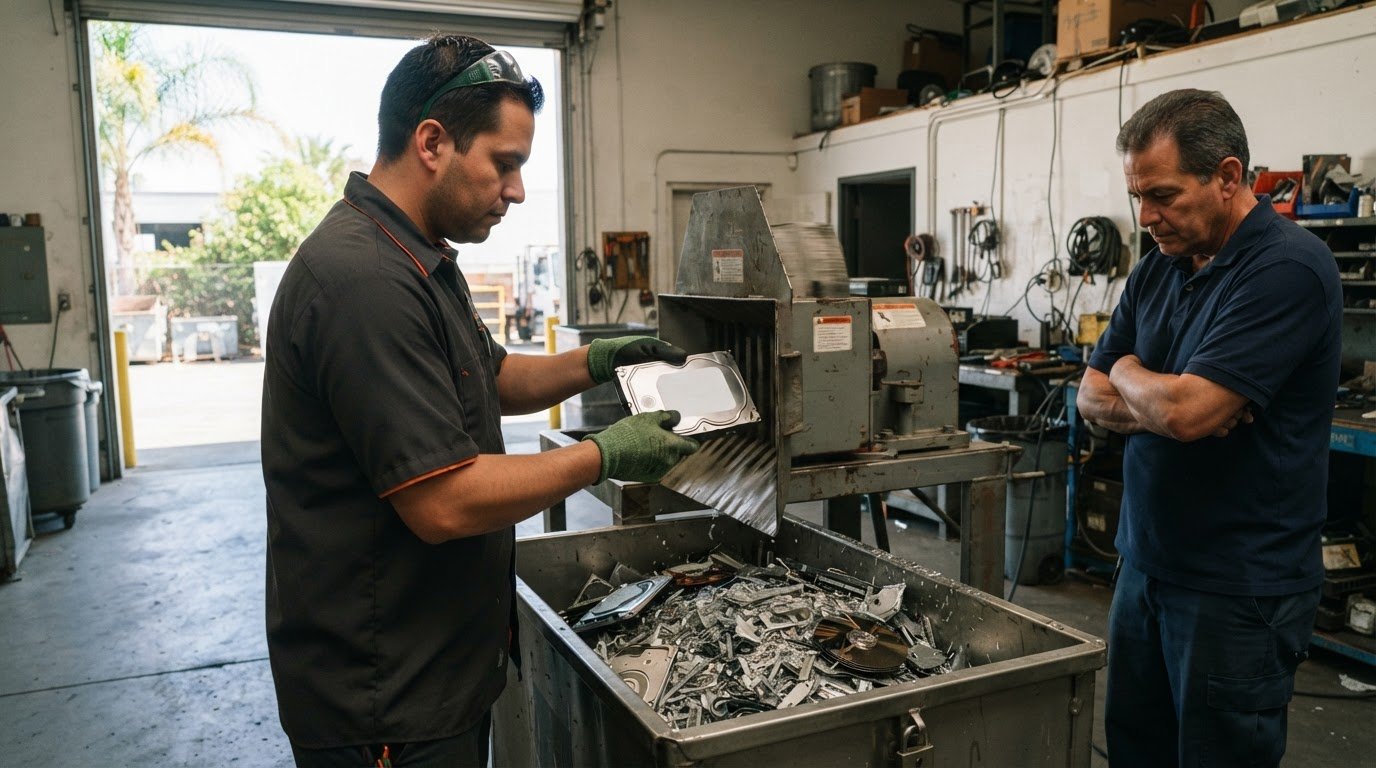
A recycling pickup alone doesn’t confirm that a hard drive’s data has been destroyed. For Costa Mesa businesses retiring storage devices, certified hard drive destruction in Costa Mesa provides a defined end-of-life process. Shredding physically destroys the drive and its data, while the right method depends on the media type and the organization’s disposal needs.
It’s reasonable to want more than a device removed from your premises: you also need to understand how it’s handled and what documentation you’ll receive. This guide explains how certified hard drive destruction in Costa Mesa supports business data disposal, how to choose a method for hard drives, solid-state drives, and other media, and what destruction certificates and audit records can show. It also covers practical steps for identifying devices and retaining records of completed destruction, so you can plan the process clearly.
Key Takeaways
- Understand how erasure, degaussing, punching, and shredding differ so you can evaluate the right approach for retired drives.
- Match the destruction method to the media type, including hard drives, SSDs, and other storage devices.
- Learn which details a destruction certificate or audit record can document about completed work.
- See how OC Recycling’s Certified Product Destruction fits into a business’s end-of-life handling for data-bearing products.
How can hard drive destruction Services Help my Business in Costa Mesa?
For a Costa Mesa business, destruction methods vary in whether they preserve a reusable drive or physically damage it. Certified hard drive destruction in Costa Mesa provides a defined process for retiring data-bearing devices, matched to the media type and disposal goal.
On-Site and Off-Site Services
On-site shredding lets staff observe physical destruction at the business location; off-site shredding sends drives elsewhere for processing. On-site degaussing uses a magnetic field to disrupt data on suitable magnetic media, while punching physically damages a drive. Mail-in service adds shipping and transit to the process. In-house shredding gives the business control over the equipment and handling, but also requires it to manage destruction itself.
Erasure overwrites data and may suit a functioning drive intended for reuse. Degaussing targets magnetic storage, while punching and shredding physically damage drives. A recycling pickup alone doesn’t establish that data has been destroyed.
Costa Mesa Provider Options
Businesses seeking certified hard drive destruction in Costa Mesa can compare documented destruction and data destruction services by looking at where the work takes place, whether devices are shipped or handled on-site, and what records confirm completion. These distinctions help clarify how a service compares with mail-in options or in-house shredding, without treating the approaches as equivalent.
After destruction, shredded materials may be sorted for recycling, separating recoverable materials from mixed fragments. Data destruction and material recycling are separate steps. Businesses in Irvine can use the same distinction when planning device disposal.
Project costs depend on factors such as device quantity, media type, and whether handling is on-site or off-site. Requesting a quote based on those details gives you a more relevant estimate than assuming one price fits every batch.
Choosing an appropriate destruction method for each media type
Start by identifying the device and deciding whether it needs to be reused. A hard disk drive (HDD) stores data magnetically, while a solid-state drive (SSD) uses flash memory. The media type affects which sanitization or destruction method is appropriate.
For a functioning drive intended for reuse, data erasure may fit the goal. Destruction is the clearer route when a device won’t be reused or policy requires it. NIST media sanitization guidance can help structure the decision around information sensitivity, device type, and intended outcome. Don’t assume a method suitable for an HDD works equally well for an SSD.
- HDDs: Match the method to whether the drive will be reused or physically destroyed.
- SSDs: Select a process designed for flash storage, rather than assuming magnetic-media methods apply.
- Portable media: Include USB drives, CDs, and DVDs in the inventory, alongside phones, tablets, and laptops.
- Other devices: Printers and computers may also contain storage media that needs appropriate handling.
California and federal requirements depend on the data and organization involved. HIPAA 45 CFR §164.310(d)(2) is relevant to disposal of protected health information, while California’s Confidentiality of Medical Information Act, Civ. Code §56, concerns healthcare data handling. GLBA 16 CFR Part 314 concerns financial institutions’ non-public personal information; PCI DSS v4 Requirement 9.4 addresses cardholder data. Government organizations should follow the requirements that apply to their records and systems.
For each batch, document the media type, intended outcome, and selected method before processing. A written inventory helps distinguish an HDD scheduled for reuse from an SSD or USB drive designated for destruction. Businesses handling mixed equipment can explore data destruction support as part of planning device disposition.
Destruction certificates and audit records
A destruction certificate connects completed media handling to an organization’s inventory. For a useful audit trail, match each document to the devices processed, the method used, and the completion record.
NAID AAA Certification and Audits
NAID AAA Certification is administered by i-SIGMA and includes an annual third-party audit. It can help assess a provider’s processes, but it doesn’t replace records for your specific destruction batch. Keep the certificate and service documentation together, noting which devices were destroyed and whether the recorded method was shredding, degaussing, or another process.
For a Los Angeles data center decommissioning, destruction certificates can be packaged as audit evidence for SOC 2, ISO 27001, and HIPAA. Treat the certificate as one part of the evidence set, alongside an inventory that identifies the assets covered. This helps reviewers connect a completed service to the systems and records involved.
IT Inventory and Chain of Custody
A practical chain-of-custody record follows devices from collection through final processing. Include a device description, serial number when available, transfer dates, responsible parties, and destruction method. For example, an inventory row might identify an HDD by serial number and record shredding, while a separate row identifies a device processed through degaussing.
Use consistent identifiers across the inventory, transfer record, and destruction certificate. If a serial number is unreadable, record another usable identifier rather than leaving the device unmatched. Keep exceptions visible, such as a device that couldn’t be processed with the batch.
Before service, reconcile the inventory against the devices scheduled for destruction. Afterward, match the certificate to that list and retain the transfer documents under your organization’s recordkeeping process. Together, these steps show what was handled, which method was used, and what documentation supports the completed work.
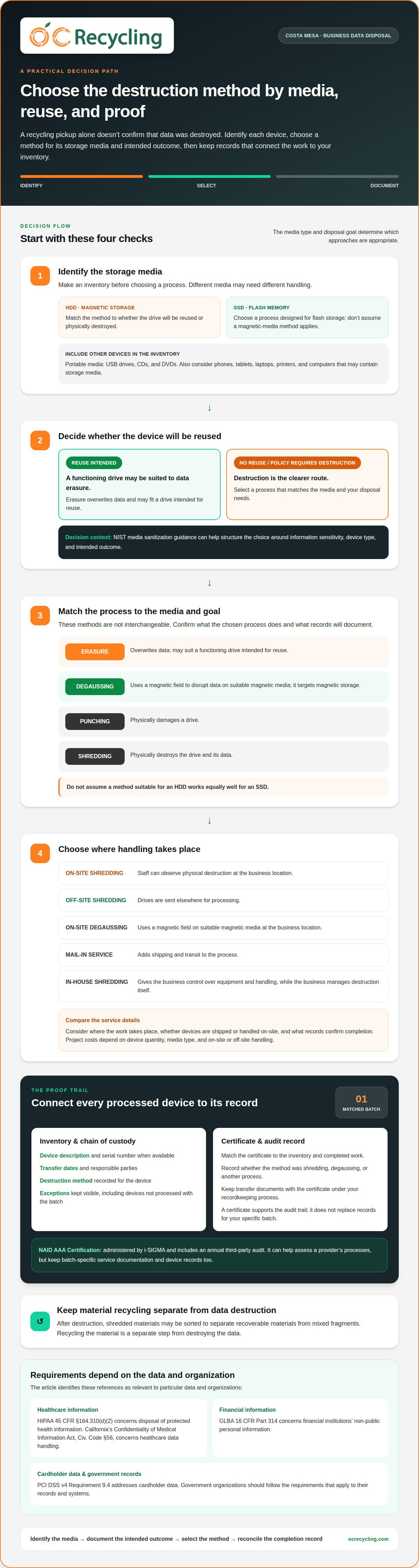
Hard drive destruction process
A documented process connects each electronic device to its final disposition. In Costa Mesa, start with an inventory, choose a method suited to the media, track handling, and retain the completion record.
- Identify devices. Separate HDDs, SSDs, USB drives, and computers containing storage. Record make, model, serial number when legible, and the department releasing each item.
- Protect wanted information. Back up files the business needs to retain before devices enter destruction. Remove drives from computers when practical, and keep each removed drive associated with its inventory entry.
- Choose a method. Match the process to the device and intended outcome. Erasure can suit reuse; physical destruction suits media designated for destruction. Don’t treat every storage type as interchangeable.
- Track the handoff. For on-site work, record the batch and destruction activity at the business location. For off-site processing, document the transfer and connect received devices to the inventory before processing.
- Close the record. Match the destruction certificate to the processed items, then document any exceptions. Keep the certificate and related transfer records with the organization’s IT disposal documentation.
For example, a Costa Mesa office retiring an HDD and several USB drives can list each device separately, record the chosen method, and reconcile the final certificate against the inventory. This makes missing, substituted, or unprocessed items easier to identify before the batch is closed.
After data destruction, shredded materials may enter recycling streams, where recoverable materials can be separated. Destruction and recycling are distinct steps: the first addresses stored information, while the second concerns the physical material.
These steps give a business a practical sequence for managing destruction services across Orange County, from inventory to final records. To arrange data destruction for retired devices, use the available service contact path.
OC Recycling: Certified Product Destruction
OC Recycling offers Certified Product Destruction and Data Destruction for businesses retiring products that may contain sensitive information. These services are a practical next step when your organization has identified devices for end-of-life handling and needs to address product destruction and data disposal.
For mixed equipment batches, separate data-bearing devices from other recyclable electronics in your inventory. This keeps data destruction requirements clear while supporting responsible electronics handling. OC Recycling also offers Electronics Recycling, as well as Scrap Metal Purchasing and CRV Redemption for applicable materials.
If your Costa Mesa business is planning product or data destruction, contact OC Recycling to discuss your needs.
Make Secure Disposal Part of Your IT Plan
Build device retirement into regular IT planning instead of treating each disposal as a last-minute task. Assign responsibility for identifying equipment, documenting its intended disposition, and retaining the related records. A consistent workflow helps departments coordinate replacements and reduces the chance that retired devices are forgotten in storage.
Planning certified hard drive destruction in Costa Mesa can also prompt a broader review of how your organization handles unwanted materials. OC Recycling offers Electronics Recycling, Scrap Metal Purchasing, and CRV Redemption to support different material streams as business needs arise. Keep those categories separate from data destruction so each item follows an appropriate route.
When you’re ready to discuss secure disposal for your business, contact OC Recycling about secure disposal. A clear next step can help your team move from planning to an organized retirement process with confidence.
Frequently Asked Questions
What hard drive destruction methods do Costa Mesa providers offer, such as shredding, crushing, or degaussing?
Methods vary by storage device and service arrangement. Shredding reduces drives to fragments, while degaussing disrupts data on magnetic media; punching physically damages a drive. Erasure may suit a functioning device intended for reuse. Because an HDD and an SSD may need different handling, identify each media type before choosing a destruction method.
Do Costa Mesa hard drive destruction providers issue certificates of destruction and what details do they include?
OC Recycling provides clients with certificates of destruction. For clear records, connect the certificate with the batch inventory and supporting handling documents. Device descriptions or serial identifiers, the recorded destruction method, and completion details can show which equipment the record covers. Retain the certificate with relevant IT disposal records so your team can find it during an internal review.
How much does hard drive destruction cost in Costa Mesa, including pickup and on-site service?
Destruction pricing depends on the project and is provided after a quote request. Relevant cost factors include the number and type of devices, the selected method, and whether handling involves pickup or on-site service. A batch of mixed HDDs, SSDs, and portable media may require different processing from a group of similar drives. No fixed service price applies to every project.
Are there minimum quantities, per-drive fees, or business pricing for hard drive destruction in Costa Mesa?
Minimum quantities and per-drive fees depend on the service arrangement, so there’s no universal rate for every business. Project pricing can reflect device count, media types, handling, and the requested destruction method. For example, a business retiring assorted laptops and separate drives has different batch requirements from one disposing of a uniform group of HDDs.
Do local providers offer on-site hard drive shredding or secure pickup in Costa Mesa?
On-site shredding and pickup are distinct arrangements: one destroys drives at the business location, while the other transports devices for processing elsewhere. Pickup may involve a charge based on the items and quantity. Plan the handoff by grouping devices, recording inventory details, and arranging the process around your preferred location and recordkeeping needs.
How can individuals and businesses prepare hard drives for certified destruction?
Back up files you need to keep, then identify each computer, external drive, or portable storage device slated for destruction. Businesses can record device details and retain an inventory for their disposal records. Remove a hard drive from a computer when that suits the process, and keep it associated with the computer’s information. These steps apply to Costa Mesa and nearby Santa Ana, Anaheim, Huntington Beach, Orange, Irvine, Garden Grove, Westminster, Fountain Valley, and Tustin.